More Internet Use, More Need for Safety
Internet access is spreading fast, from villages to cities. Students use it to study, parents use it for banking, and almost everyone uses it to talk with friends. As more people go online, more of their photos, messages, passwords and account details travel across the internet too. That is why every user now needs to know how to stay safe online.
Online security: protecting the data and information that we share on the internet or store on it.
What Goes Wrong When Online Security Is Weak
We put many kinds of information on the internet. If that information is misused, serious trouble can follow. The information most at risk is:
- photos shared on social media and the messages typed with them
- passwords for social media and email
- passwords used for internet banking
- details filled into online forms on different websites
When a web browser gets hacked or someone's personal details get stolen, the cause is weak online security. The stolen details can then be used to threaten and frighten the person they belong to. Stolen banking details can be used to take money out of that person's bank account.
Checking a Website Before Trusting It
Any website we use for an online service should be safe. Before typing your name, phone number, password or any other personal detail into a website, check whether it is genuine and secure. The way to check is to look at the website's security certificate.
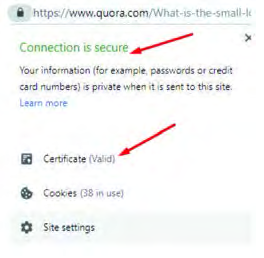
- Step 1: Look at the address bar at the top of the browser, where the website's address is written.
- Step 2: Click the small symbol just before the address, which is usually a padlock.
- Step 3: A pop-up window opens. It tells you whether the website has been verified and whether it is safe to give it your personal details.
- Step 4: Enter your details only if the window shows 'Connection is secure' and 'Certificate (Valid)'.
Links sent in the name of a gift or a lottery prize, and unwanted links that arrive on social media, are not all safe. A message such as 'You have won a new mobile phone, click here and fill in your details' is very often a trap for stealing information. Clicking such a link, or filling in a form on such a site, can let your information be stolen. So before filling in any online form, find out whether the website is genuine.
When you finish using a website you signed in to, always sign out, especially on a shared computer or someone else's device.
Cyberbullying Awareness
Cyberbullying: the misuse of information and communication technology, in which electronic devices such as mobile phones, computers and tablets are used over the internet to cause mental stress to a person.

Cyberbullying takes many forms. Each of the following is an example of it:
- threatening to make someone's personal details public on the internet
- sending messages to frighten a person
- sending messages that contain indecent material
- putting someone down so that they feel worthless
- spreading false rumours about someone online
Cyberbullying of teenagers mostly happens through social media, messenger apps and email. So when using these, follow these habits:
- Do not accept friend requests from people you do not actually know.
- Do not share personal details or private matters while chatting or messaging online.
- Keep the photos and other details you share on social media protected.
- If anyone tries to bully you online, keep a record of it, such as screenshots and messages, and tell your parents or guardians.
If you are bullied online, do not stay silent. Keep the evidence and tell an adult you trust.
Digital Footprint Awareness
When you walk along a muddy path, you leave footprints behind you. Everything we do on the internet leaves marks behind in the same way. These marks are called a digital footprint.
Digital footprint: the trail of data evidence created whenever we use the internet through any kind of electronic device.

A digital footprint includes the websites we have visited, the emails we have sent, the information we have given for online services, and the likes, shares, comments and status updates we post on social media. All of this evidence can be searched for when needed.
For example, when an unknown person does something through a website, the IP address given to them by their internet service provider can be traced to find out where that person is. In the same way, if someone posts threatening content on social media and deletes it later, a copy stays saved in the social media company's database. Using evidence found like this, the police can catch that person.
Thinking 'once I delete it, it is gone' is wrong. Something posted online can leave evidence behind even after it is deleted. Think before you post, not after.
Clearing Browser History and Protecting Passwords
A device used for the internet keeps a record of the websites we visited, and it may also store the passwords we typed. This is risky on a shared computer or someone else's device, because whoever uses it next can see those details. So after using the internet on such a device:
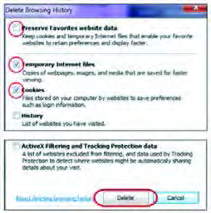
- Step 1: Open the history section of the browser.
- Step 2: Open the option for deleting browsing data and tick the history, cookies and temporary files.
- Step 3: Click 'Delete' to clear the cache.
When using a device that is not your own, never click yes if a website asks whether to save your password. A saved password can be misused by data collectors.
Firewall
When data moves through a computer network such as the internet, harmful data can come in along with useful data. A guard at a gate lets known people in and stops strangers. A firewall does the same job for a computer.
Firewall: a system that blocks harmful data and unauthorised network signals during data exchange over a network, and lets only safe data reach the computer.

A software firewall comes installed along with the computer's operating system, for example Microsoft Windows. It should always be kept switched on while using the internet.
Bank data servers and the website databases of many organisations hold the personal details of thousands of people. When the firewall is weak, events such as money being stolen by ATM hacking and data being stolen by website hacking take place. There have been cases in Nepal too where people involved in such crimes were arrested.
Cyber attack: an act of breaking into a computer, network or data server through weak security to steal money or data.
Computer Virus
Computer virus: a program that mixes itself into the programs that run a computer, makes copies of itself and infects useful programs.
Slowly the virus starts giving the computer orders according to its own program. An infected computer therefore shows problems like these:
- programs open by themselves
- some data gets deleted
- the computer becomes slow at processing information in its memory
A computer virus does not jump from one computer to another on its own. When data is copied from an infected computer onto a pen drive, the virus file is copied too without being seen, and when that pen drive is plugged into another computer the virus arrives there. A virus can also get in along with data downloaded from an unauthorised website.
Antivirus
Antivirus: a program installed on a computer that can search for any virus that has got in and remove it.
Antivirus software is used to detect, separate and remove viruses that have reached the computer through the internet or through a pen drive. Microsoft Defender, for example, is antivirus software that comes with Windows when it is installed. Other antivirus software can also be bought and installed.
| Point | Firewall | Antivirus |
| Main job | Stops harmful data and unauthorised signals from coming in | Finds and removes a virus that has already got in |
| Where it works | At the gateway between the network and the computer | On the files and programs inside the computer |
| Protects against | Cyber attacks coming through the network | Viruses arriving by internet or pen drive |
| Example | The firewall that comes with Windows | Microsoft Defender |
A firewall keeps danger out; antivirus removes danger that has already got in. Good protection needs both.
Common Cyber Crimes in Nepal
Unsafe use of the internet has led to many incidents. Some of the main cyber crimes seen in Nepal are:
- ATM attacks: hacking ATMs or bank systems to steal money
- Spear phishing: sending one particular person a fake message or link that pretends to come from someone they trust, to get their password or details
- Privacy leaks: personal details getting out without permission
- Social media crimes: harassment, identity theft, and spreading false information
The full lesson is waiting for you
The notes are free to read in full. A free account opens the rest of the practice, and tracks your progress and confidence score for every subject. Presentations and videos need approval from Learn Yeti.